

1. Charge
Set up your tablet close to an electrical outlet in your front of house or your kitchen. It should have enough charge to turn on straight away, but simply plug your charger into your most convenient wall socket and connect to charge.
2. Turn on
Once your device has been plugged in and is fully charged, simply press and hold the single button on the side of the device to turn on.
3. Login
Log in to access the klikit enterprise platform using the following steps:
a. Open Google Play Store and download the klikit app here.
b. Enter your username and password details (you should have received these via email).
4. How to confirm if your information is correct.
Once logged in, you will see the following live order dashboard, like the one seen below ⬇️ 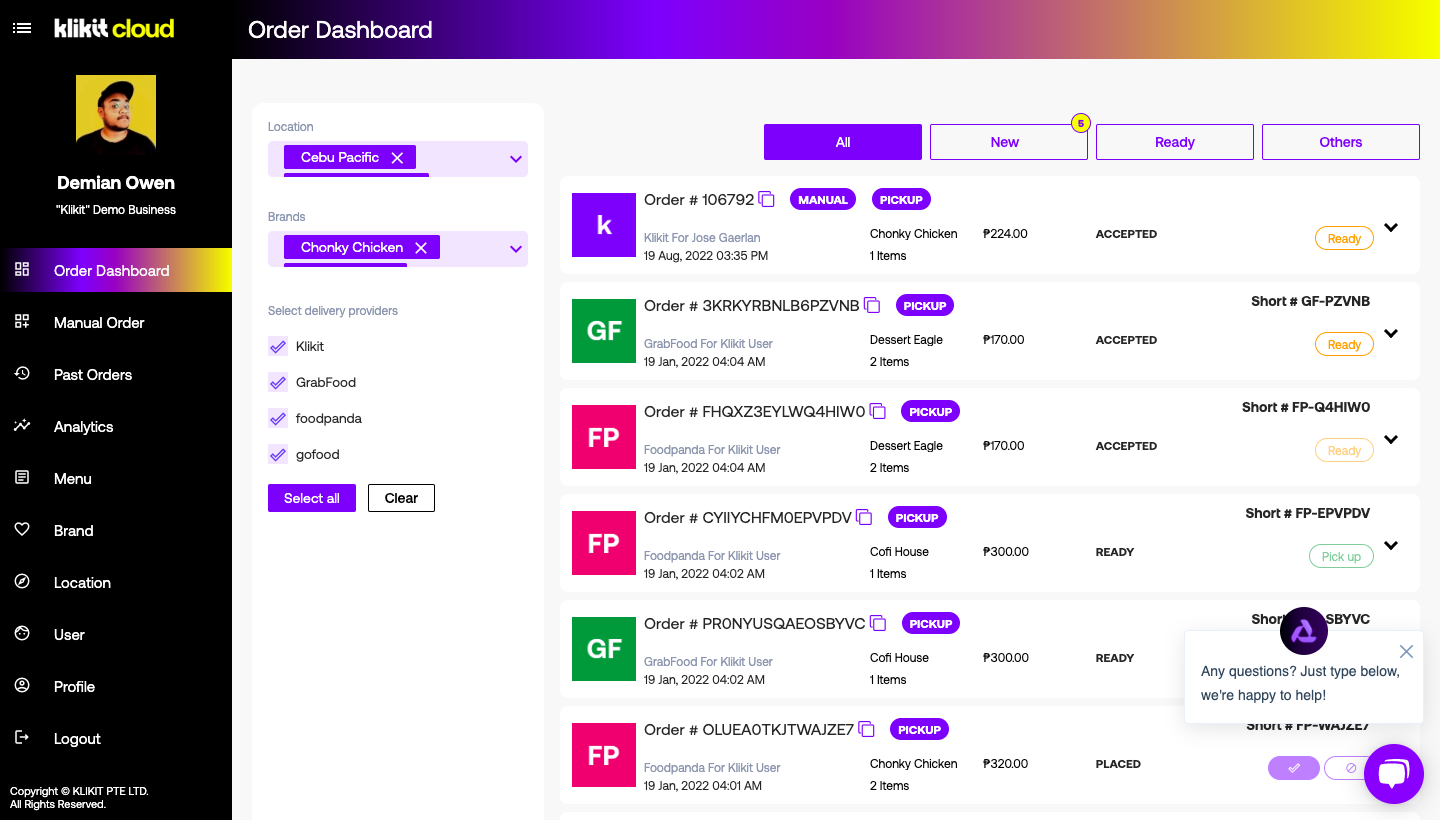
Please check your:
a. Profile details are correct (first name, last name, email, address, phone number)
b. Menus are correct
c. Locations are correct (branch name, phone, address)
d. Nominated restaurants have the correct name, banner photo, and logo.
5. How to start receiving orders (incl. Accept, decline)
You are now live and able to start receiving orders through the klikit enterprise platform!
To view incoming orders, simply select the ‘Order Dashboard’ tab. For every new order you receive, a notification sound and message will appear on the screen. View to accept or decline the order as you see fit. Remember that this Dashboard will show you orders from any/all brands you have integrated with the klikit platform.
Common questions
Paano ito gamitin?
Follow the Quick Setup Guide steps. First charge the tablet: "Set up your tablet close to an electrical outlet in your front of house or your kitchen." Then turn it on by pressing and holding the single button on the side of the device. Log in by downloading the klikit app from the Google Play Store and entering the username and password you received via email. Once logged in you will see the live order dashboard, where you should check that your profile details, menus, locations, and nominated restaurants are correct. After that you are live and able to start receiving orders through the klikit enterprise platform.
Paano ako magsisimula gamitin ang tablet?
Plug the charger into your most convenient wall socket to charge, then press and hold the single button on the side of the device to turn on. Next, open Google Play Store, download the klikit app, and enter your username and password details.
Paano ko malalaman kung tama ang mga detalye ko?
Once logged in you will see the live order dashboard. Check that your profile details are correct (first name, last name, email, address, phone number), your menus are correct, your locations are correct (branch name, phone, address), and your nominated restaurants have the correct name, banner photo, and logo.
Paano ko matatanggap ang mga order?
To view incoming orders, select the ‘Order Dashboard’ tab. For every new order, a notification sound and message appears on the screen, and you can view it to accept or decline as you see fit. The Dashboard shows orders from any/all brands integrated with the klikit platform.
Saan ako makakahingi ng tulong?
Tap the "Live Chat" button on the right bottom corner of your screen.
Need Help? Contact us on Live Chat
Tap "Live Chat" button on the right bottom corner your screen